

Table of Contents
With the rollout of iOS 26, Apple has unveiled one of its most significant updates ever, combining a striking new visual approach with powerful artificial intelligence features. In this guide, explore the standout iOS 26 features, discover what the Liquid Glass design means for everyday use, check the full list of iOS 26 eligible iPhones, and learn simple steps to update and get the best from Apple’s software revolution.
Apple’s iOS 26 update has arrived, setting a new bar for what users can expect in both design and intelligence-driven capabilities. Whether upgrading to the new Liquid Glass look or exploring Apple Intelligence iOS 26 features, this release offers something for power users, creators, and everyday iPhone fans. The iOS 26 update is available for select iPhones, so it’s vital to check if your model is eligible before starting.
What’s New in iOS 26?
iOS 26 brings a sweeping redesign and transformative features focused on visual immersion, productivity, and smarter device interactions.
Liquid Glass Design: A Futuristic Look
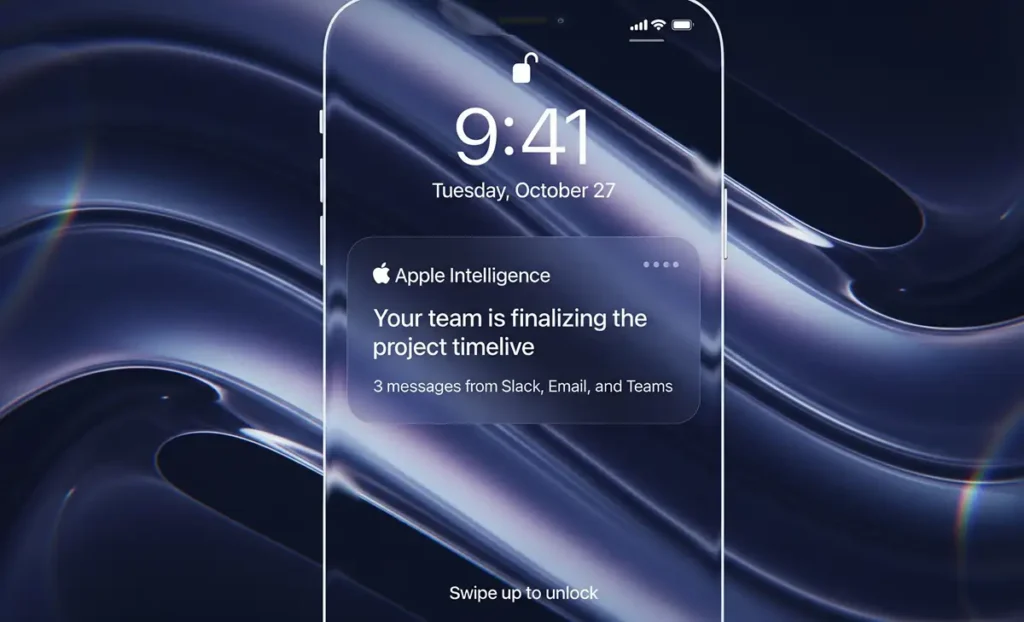
The headline visual change is the Liquid Glass design iOS 26. Apple has reimagined the iPhone interface using translucent, glass-like elements. This makes app icons and buttons refract light, and the UI moves fluidly as you interact.
- Lock screen: Time and widgets adapt with 3D motion effects that respond to device movement.
- Home screen: App icons can be light, dark, color-tinted, or clear for a truly custom look.
- Controls: The control center and media elements use real-time glass reflections for a livelier, more immersive UI.

Apple Intelligence iOS 26: Smarter, Faster, Private AI
A major highlight, Apple Intelligence iOS 26 introduces on-device AI capabilities that handle translation, visual analysis, smart reminders, and creative tools, all focused on privacy.
Key iOS 26 features powered by Apple Intelligence:
- Live Translation in Messages, FaceTime, and Phone Calls—real-time text and spoken translations in up to eight languages.
- Visual Intelligence searches the content of photos, screenshots, and apps for smarter actions.
- Genmoji: Use AI to create personalized emojis, background images, and more.
Other Standout Features in iOS 26
- Dynamic lock screen: Wallpapers and time display adapt in real time.
- App icon customizations: Mix clear, glass, and color styles.
- Message polls and group typing indicators: For more interactive group chats.
- Enhanced Reminders and Apple Maps: AI-driven task suggestions and smarter route alerts.
- Apple Music AutoMix & Lyrics Translation: Seamless DJ-style mixes and automatic lyric translations.
- Game Hub and Accessibility: A New centralized app for gaming and major improvements for Braille users.
The iOS 26 update pushes boundaries while keeping the familiar ease of iOS.
Complete List of iOS 26 Eligible iPhones
Before updating, confirm that your device is supported. The iOS 26 update is available for the following models:
| Supported iPhone Models |
|---|
| iPhone 17, iPhone 17 Air, iPhone 17 Pro, iPhone 17 Pro Max |
| iPhone 16, 16 Plus, 16e, 16 Pro, 16 Pro Max |
| iPhone 15, 15 Plus, 15 Pro, 15 Pro Max |
| iPhone 14, 14 Plus, 14 Pro, 14 Pro Max |
| iPhone 13, 13 mini, 13 Pro, 13 Pro Max |
| iPhone 12, 12 mini, 12 Pro, 12 Pro Max |
| iPhone 11, 11 Pro, 11 Pro Max |
| iPhone SE (2nd and 3rd Generation) |
Note: Some advanced Apple Intelligence iOS 26 features require iPhone 15 Pro or later, due to the more powerful chip and upgraded neural engine.
How to Update to iOS 26
Eager to try the iOS 26 features and the new Liquid Glass design? The update process is easy but following the right steps ensures a trouble-free upgrade.
Step 1: Backup Your iPhone
Before any major iOS update, safeguard your data.
- Go to Settings > [your name] > iCloud > iCloud Backup.
- Tap “Back Up Now” and wait until the process is complete.
- For extra security, consider a full iTunes or Finder backup to your computer.
Step 2: Start the Update
- Plug your iPhone into power and connect to Wi-Fi.
- Go to Settings > General > Software Update.
- If iOS 26 is listed, tap “Download and Install”.
- Follow the on-screen prompts and let your iPhone restart when complete.
Step 3: Troubleshoot Common Update Issues
If you don’t see iOS 26 or an error occurs:
- Make sure your iPhone model matches the eligibility list.
- Check for enough free storage (at least 10GB recommended).
- Restart your device, then try again.
- If problems persist, use Finder/iTunes on a Mac/PC for a manual update.
Conclusion
iOS 26 sets a new standard for iPhone, wrapping advanced intelligence and a beautiful, fluid Liquid Glass design into one seamless experience. Whether for productivity, creativity, or everyday communication, this update delivers on every front—provided the device meets Apple’s updated requirements. Checking the iOS 26 eligible iPhones list, backing up devices, and following update steps are crucial for a smooth transition. Dive into iOS 26 today and redefine your iPhone experience like never before.
Frequently Asked Questions
iOS 26 features include the Liquid Glass design, advanced Live Translation, powerful on-device Apple Intelligence, customizable app icons, interactive messaging tools, and major accessibility enhancements.
iOS 26 eligible iPhones include the iPhone 17 and 16 series, iPhone 15, 14, 13, and 12 families, as well as iPhone 11 and SE (2nd/3rd gen). Some older models like XS, XS Max, and XR are no longer supported.
Apple Intelligence in iOS 26 enables more complex, private, and context-aware interactions—like Genmoji creation, on-device translations, and advanced photo analysis—beyond Siri’s basic voice assistant abilities.
The Liquid Glass look applies automatically after updating to iOS 26. Visit Settings > Home Screen to try clear, tinted, or dark icon themes, and enjoy dynamic changes on the Lock and Control Center screens.
Yes, Apple thoroughly tests major releases, but backing up your device before updating is always wise to prevent any data loss.
Key Takeaways
- iOS 26 introduces a stunning Liquid Glass design and powerful AI features, enhancing user experience across devices.
- Key features include real-time translation, smarter device interactions, and customizable app icons for a personalized look.
- Ensure your iPhone is eligible for iOS 26 by checking the supported models before updating.
- Backup your iPhone before starting the update process to safeguard your data.
- Follow simple steps to install iOS 26 and enjoy its innovative features for productivity and creativity.
Also Read: